Making OpenCode Mine: Usage Tracking and the Web UI in My Pocket
How I rebuilt OpenCode's usage tracking, tamed context resets, and made the whole environment reconstructible, with the web UI in my pocket.
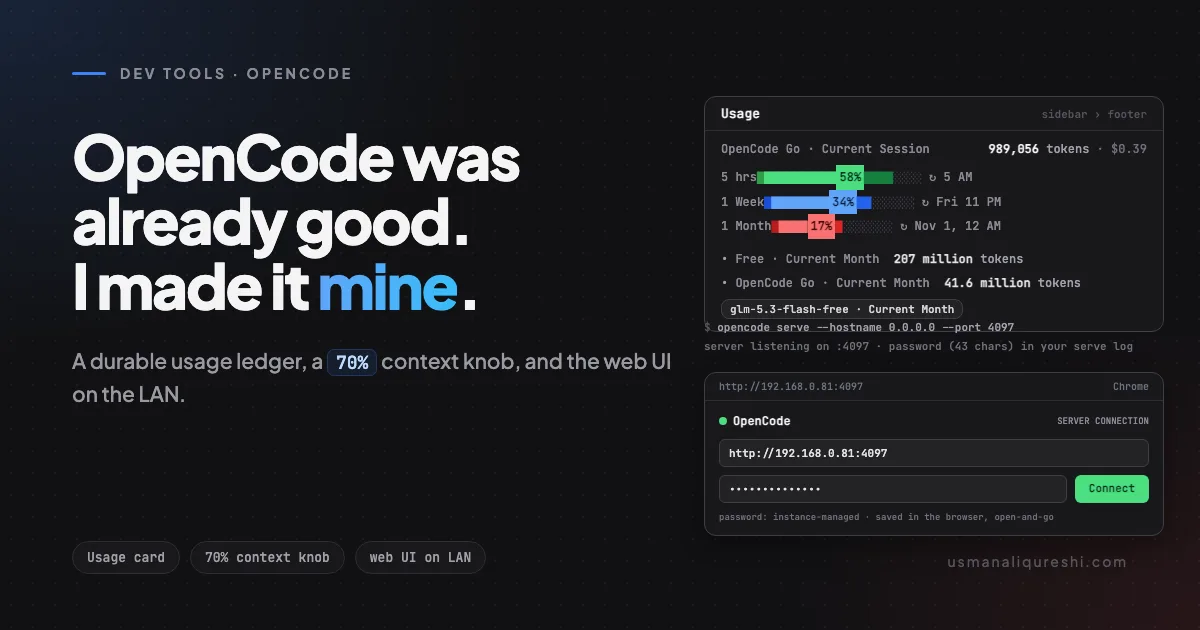
OpenCode was already my daily driver by October 2026. The terminal UI is fast, the agent loop is honest about what it is doing, and the web UI ships in the same binary. Nothing about the stock setup embarrassed me.
Four things still bugged me:
- Token consumption was invisible. I could see a file diff, but not what a month of sessions cost me against the free and paid lanes I actually use.
- A plugin bug could take the whole TUI down with it. That had happened once, on a first-paint race, and the crash erased the screen out from under me.
- Context discipline relied on luck. Long sessions drifted, prompts bloated, and the repair only happened when I noticed.
- I was tied to the desk. The terminal is great next to the laptop and useless when I am in the kitchen with a coffee.
This post is the result. Each fix had to earn its complexity, and everything now lives in one folder that can rebuild the whole environment after a reinstall. Stock OpenCode is the base; these are the four things that made it mine.
What stock had, and what it hid
OpenCode 2 keeps one clear split I now treat as a law: ~/.config/opencode/opencode.jsonc is the server config, ~/.config/opencode/cli.json is the TUI-only config. Providers, MCP servers, and permissions live in the first; theme, tabs, scroll behavior, and TUI-side plugins live in the second. The split is documented, but it still bites: a TUI widget listed only in the server config never renders in the terminal; it needs its own line in cli.json.
The sidebar footer is a plugin slot. The built-in block aggregates cost, sessions, and a streak, which is pleasant trivia, not planning data. What I wanted sat one level deeper: how much of the current 5-hour window and current month is left, per lane, with real numbers instead of vibes. The community plugin opencode-usage-quota-tracker promised exactly that view, so I installed it and expected to be done.
The usage card: a ledger that cannot forget
The plugin was close. Version 1.0.0-alpha.6 had two real problems: it could crash the TUI, and every number it showed evaporated on restart. I patched it instead of forking it, because the patch is one file that can follow every plugin update. Three behaviors matter most.
First, a crash guard. The stock widget used a non-null lookup while its provider list was still polling, so first paint could hit undefined is not an object (evaluating 'currentView(sessionID).rows') and take the TUI with it. The patched code re-resolves the view and falls back to a stub row instead of assuming a value is there.
Second, a durable month ledger. The widget now reads OpenCode's own SQLite database at ~/.local/share/opencode/opencode.db, in read-only mode, from the real-time session_message table, with a legacy fallback for older servers. High-water marks are stored per bucket and per model, so numbers never move backwards within a month even if sessions get deleted (deleting a session cascades its message rows away; the mark stays). Restart the TUI, delete a session, clear every cache, the month totals hold.
Third, honest presentation. The free lane and the paid lane get separate rows, Free · Current Month and OpenCode Go · Current Month, because those are genuinely different budgets. BYOK traffic is deliberately not displayed; that was my call, not the plugin's defaults.
For the paid lane, the server reports percent windows (5 hrs, 1 Week, 1 Month) and those render as bars that start full and drain with usage. Zoning is on the bar only: green while more than half remains, blue down to 20 percent, red below. The percent label sits centered inside the fill as bold black text, which required building the label from adjacent text nodes with background colors; spans silently drop background in the terminal renderer, text nodes keep it. Reset dates compact themselves: ↻ 5 AM instead of a paragraph, tomorrow 3:35 AM when the date rolls, a weekday inside the week, a full date beyond it. The small details were a whole session of their own: softening every zone color about 28 percent toward black so the card stops shouting, formatting 207 million tokens instead of 207,238,912 tok, and collapsing $0.0000 into $0.
A session currently reads like 989,056 tokens · $0.39, one line, bold count, quiet cost. Under that sit model pills for the current month, each labeled <model-id> · Current Month, backed by the ledger and sorted by usage, with an hourglass marker on any model the server has put on cooldown. My default lane is OpenCode's free tier (opencode/glm-5.3-flash-free is the configured default), and the Go lane carries the paid view with real cost. The percent windows come from OpenCode's usage API after a /connect with a read-only console key, so the bars cost nothing to refresh.
The maintenance tax nobody mentions
Patching a cached npm package has one obvious flaw: the cache is disposable. opencode plugin update does not edit the existing install, it creates a new timestamped directory and re-downloads vanilla code. The patch evaporates and the widget regresses silently.
So the patch keeps a canonical copy outside the cache, and re-applying it is two lines:
W=$(find ~/.cache/opencode/npm/opencode-usage-quota-tracker@latest -name tui.tsx -path "*opencode-usage-quota-tracker*" | head -1)
cp ~/harness-custom/opencode-restore/patches/tui.tsx "$W"
A small JSON file in the same patches/ directory records which plugin version the patch targets, so a future alpha jump gets re-checked, not blindly pasted. After a re-copy the TUI needs a full quit and relaunch; a live reload will not pick up a changed TUI-side plugin file.
One more quirk cost me ten confused minutes before I trusted the folder's notes: opencode service restart reports the call as cancelled or interrupted, mid-sentence, every time. It lies. The restart succeeds, and a separate opencode plugin list call is how you verify it. After every plugin update I now run the same three commands: update, re-copy, then opencode plugin list with eyes open. That ritual is why the next section exists.
The folder that rebuilds my environment
Somewhere in that same session I stopped treating my OpenCode setup as a pile of config and started treating it as maintained software. Maintained software has a repository. Mine is a folder:
~/harness-custom/opencode-restore/
├── RESTORE.md            the master document, written to be executed
├── config/               opencode.jsonc, cli.json, AGENTS.md, package.json,
│                         package-lock.json, theme, start-chrome.sh
├── patches/              tui.tsx (the canonical patched widget) + widget-package.json
├── agents/               five superpowers workflow agents
└── skills-backup/        six superpowers skills + macos-computer-use
RESTORE.md is the important part. It is not documentation in the "here is what I believe" sense; it is a procedure in the "here is what to do, in order, with the exact commands" sense. Inside: the file map, the two-config split with the trap called out, the server plugin list with its options, the widget patch with each behavior verified at the time of writing, the credentials steps that cannot be copied as files, the plugins I deliberately removed so nobody re-adds them, and a verification checklist with expected outputs. A note on the two removed items explains why the V2 loader rejects the old V1-SDK plugins, and one entry says plainly: vim-mode plugins need not apply, I am a nano person.
That mix matters because half of this cannot live in files. API keys are /connect steps. One credential quirk is worth knowing on its own: opencode auth login does not renew an expired console key; it signs in again without replacing the key. Expired keys get replaced with new ones created in the console.
The package pin is the other half-answer. package.json plus package-lock.json freeze @opencode-ai/plugin at 1.14.48, and the first restore step is npm install inside ~/.config/opencode/, which reconstructs what the plugins compile against. The five superpowers agents are copied with their model fields already pointed at a provider I actually own (the installer's defaults pointed at plans I never had, which is the kind of detail you only want to solve once). The theme file and the Chrome-with-debug-port launcher round it out; the launcher reuses an existing listener and otherwise boots an isolated agent Chrome on port 9222 for the Playwright MCP, in a dedicated profile rather than your daily browsing.
The operational habit falls straight out of this: my next session does not need to remember any of this. I point it at the folder and say one sentence: execute RESTORE.md. The agent reads the procedure, copies files, runs npm install, re-applies the patch, and then works through the verification checklist and reports what passed. When a quirk turns out to be wrong, the note is the first thing to fix, and the folder is one git init away from versioning that fix. This is also what makes the risky parts above acceptable: the widget patch is invasive by npm-package standards, but its blast radius is bounded by a document that says exactly how to undo and verify everything around it.
One number for context discipline
The context piece worried me more than the cosmetics. An agent session that grows without a budget eventually degrades, and with different models on different windows, a fixed token count would be wrong for at least one of them. The setup I landed on has exactly one number.
OpenCode DCP is a server plugin in opencode.jsonc, configured with a single tuning option: maxContextLimit: "70%". There is no per-model table, no special cases, one global value. The semantic detail that makes it work: 70 percent is measured against the current model's context window and re-measured on every dispatch. When I am on the free lane with its roughly 200k window, the budget floats near 140k. When the session flips to a paid lane with a window around 1 million, the same knob floats near 700k without me touching anything.
The footer shows the DCP stats, so the discipline is visible rather than implied: you can see the budget shrink as the session grows, and the plugin nudges long before an enforcement moment. My input discipline stays boring on purpose, because the honest bottleneck is not the plugin's trimming, it is what deserves to be in context at all: work requests tracked in a global todo instruction, decisions and file paths kept in the list. A one-knob setup you can explain in one sentence is easier to keep than a dashboard of exceptions you have to re-derive every week.
One related cost fact is documented in the same notes and surprised me enough to repeat it. LLM prompt caches are prefix-keyed, so a "small ping" request cannot keep a cache warm between real turns; there is no cheap trick that buys the discount on demand. The models I use most (GLM and DeepSeek) already cache automatically, and the tokens.cache.read column in the session_message table shows that traffic, which is how I noticed. The lesson: context discipline is mostly about not re-reading what you can re-derive, not about babysitting a cache.
The phone as a second screen
The last piece needed no code at all. OpenCode ships a web UI, and opencode serve exposes it. On the laptop:
opencode serve --hostname 0.0.0.0 --port 4097
0.0.0.0 is what makes it visible on the LAN instead of loopback-only. Startup prints two lines that matter: server listening on http://0.0.0.0:4097 and a generated server password. When I background the server with nohup, that password line lands inside the log file I redirect output to, which is where I go get it.
On the Mac side, ipconfig getifaddr en0 (or en1 when Wi-Fi sits on the second interface) prints the LAN address (a 192.168.x.x address, say 192.168.0.81). Any phone browser, Chrome on iPhone in my case, then opens http://<lan-ip>:4097 and hits the server connection dialog. Password goes in, username opencode if the field asks for one, and the UI stores the URL and password in the browser. After the first connect it is open-and-go; a new browser or device asks once, then saves.
Underneath, this is plain HTTP Basic auth with username opencode and that instance's own password. Without credentials, every API route answers 401:
{"_tag":"UnauthorizedError","message":"Authentication required"}
Each serve instance generates its own password at startup. Restart the server, re-read the new password line, retype it once. That exactness bites because of the next trap.
opencode pair prints a one-time link with a QR code that looks like precisely the thing you want for "connect my phone". Against a standalone serve, it fails even on the first try, seconds after printing, with 401 {"_tag":"UnauthorizedError","message":"Pairing link expired or already used"}. The reason is architecture: pairing codes register on OpenCode's shared background service at 127.0.0.1:49374, are one-time, and expire in five minutes; the fresh serve instance knows nothing about them. Pairing is the companion-app flow, and the browser path is the password dialog. I lost an hour to this so you don't have to.
Sync behavior follows from the same architecture. Each serve is a standalone runtime whose session list comes from the shared database, so two devices using two different URLs see identical history, but live chat streaming is per-server: same URL means live sync, different URLs mean you see the transcript only when it has been persisted. Terminal sessions belong to the background service runtime; they appear as history on the web UI and stream live only in the terminal. Reading a finished report from the couch, this cost nothing. Pair-programming a live session with the phone in my hand would need the same URL, which is trivial on a LAN and worth knowing before you promise it.
Security note, stated once and plainly, because it is the part I would underline. This setup is for the LAN and for testing. Away from home, the supported road is OpenCode's own remote pairing (opencode pair --remote --yes) or a tunnel like Tailscale on both devices, and even then, I read the flag help first since GitHub examples drift. What I do not do is port-forward raw HTTP through a router. The passwords live in the serve log and in ~/.config/opencode/service.json, which is a fine place for a file and a terrible thing to paste anywhere public.
One number, one folder, one URL. Everything else in my setup is stock, and stock OpenCode is good.
Keep Reading
- What to Put in AGENTS.md (With a Real Example From My Repo): the same todo-and-notes discipline this post leans on, as a file every agent reads.
- Git CLI Crash Course: From Zero to Version Control Hero: the folder stops being fragile the day your restore kit is versioned; this gets the basics of
gitdown in one sitting.

Written by Usman Ali Qureshi
Senior WordPress and PHP developer with 12+ years in WordPress. I spent over a decade at InspiryThemes, home of RealHomes, one of ThemeForest's best-selling real estate themes, and I've shipped six plugins of my own. Everything I write here comes from fixing it on real sites first.
More about meWorking on a WordPress project?
Let's talk about what you're building.
I'm available for custom plugin development, performance optimization, and headless WordPress projects.