WordPress Too Many Redirects (ERR_TOO_MANY_REDIRECTS): Find the Loop and Fix It
ERR_TOO_MANY_REDIRECTS on your WordPress site or wp-admin? One curl command shows you the exact loop. Here are the five causes behind almost every case and how to fix each one.
"This page isn't working. example.com redirected you too many times."
Chrome calls it ERR_TOO_MANY_REDIRECTS. Firefox says the page isn't redirecting properly. Either way, your browser asked for a page, got told to go somewhere else, went there, got told to go back, and gave up after about twenty rounds.
It usually shows up right after you did something reasonable: switched on SSL, put the site behind Cloudflare, moved hosts, changed the domain. That's actually helpful, because it narrows things down a lot.
Most guides tell you to clear your cookies and start disabling plugins. Don't start there. Start by looking at the loop itself. It takes one command.
Step 1: see the loop with curl
Open a terminal (macOS and Linux have one built in, Windows has curl in PowerShell) and run:
curl -sIL https://example.com/ | grep -iE "^(HTTP|location)"
-I asks for headers only, -L follows redirects, and the grep keeps just the status codes and where each redirect points. A healthy site gives you something short:
HTTP/2 301
location: https://example.com/
HTTP/2 200
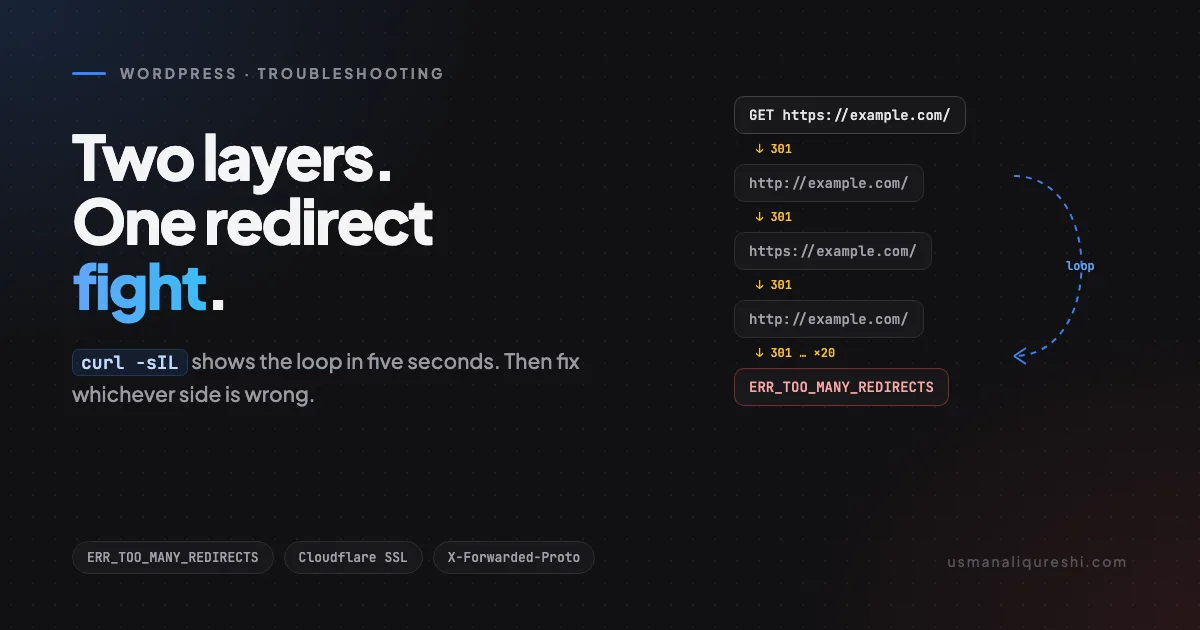
A loop looks like this:
HTTP/2 301
location: http://example.com/
HTTP/1.1 301
location: https://example.com/
HTTP/2 301
location: http://example.com/
...
Now you can see the fight. In this example, one layer keeps sending visitors to http:// and another keeps sending them back to https://. The same pattern shows up with www versus no www.
Curl also skips your browser's cache and cookies, which rules those out straight away. If curl loops, the problem is on the server. If curl is fine but your browser still loops, clear the site's cookies and cached data and try a private window.
Once you know which two URLs are bouncing, match the pattern to one of the causes below.
Cause 1: Cloudflare set to "Flexible" SSL
This is the most common one I see, by a distance.
With Cloudflare's SSL mode set to Flexible, the visitor talks to Cloudflare over HTTPS, but Cloudflare talks to your server over plain HTTP. Your server sees an HTTP request. If WordPress (or a plugin, or your .htaccess) is set to force HTTPS, it answers with a redirect to https://. The browser follows it, back through Cloudflare, which again talks HTTP to your server. Round and round.
The fix: in Cloudflare, go to SSL/TLS and switch the mode to Full (strict). That needs a valid certificate on your server, which almost every host gives you free with Let's Encrypt. Install it first if you haven't, then switch.
Don't "fix" this by removing your HTTPS redirect. That just hides the loop and leaves the connection between Cloudflare and your server unencrypted.
Cause 2: the WordPress address doesn't match the redirect rules
WordPress stores two URLs: the WordPress Address (siteurl) and the Site Address (home). WordPress redirects requests that don't match them.
So if your settings say http://example.com but your server forces https://, or WordPress says https://www.example.com while your host strips the www, you get a loop. Both sides are doing their job. They just disagree.
The fix: make WordPress agree with the URL you actually want. If you can't reach wp-admin, set them in wp-config.php, above the "stop editing" line:
define( 'WP_HOME', 'https://example.com' );
define( 'WP_SITEURL', 'https://example.com' );
These override whatever's in the database. With WP-CLI you can fix the database values directly instead:
wp option update home 'https://example.com'
wp option update siteurl 'https://example.com'
If the site just moved from HTTP to HTTPS or to a new domain, the old URL is also baked into posts and settings. Run a proper search and replace afterwards (wp search-replace 'http://example.com' 'https://example.com' --dry-run first, then without --dry-run). Don't do it with a plain SQL query. WordPress stores some settings as serialized PHP, and a raw text replace corrupts them.
Cause 3: SSL ends at a proxy, so WordPress thinks it's on HTTP
Plenty of hosts put a proxy or load balancer in front of your site. It handles HTTPS, then passes the request to PHP as plain HTTP with a header saying the original was secure: X-Forwarded-Proto: https.
WordPress decides whether a request is secure with is_ssl(), which doesn't look at that header. So WordPress thinks every request is HTTP. If anything tells it to force HTTPS, like FORCE_SSL_ADMIN or a "force SSL" plugin, it redirects to HTTPS forever. A common sign: the front end works but wp-admin loops.
The fix: tell WordPress to trust the header. Add this to wp-config.php, above the "stop editing" line:
if ( isset( $_SERVER['HTTP_X_FORWARDED_PROTO'] )
    && $_SERVER['HTTP_X_FORWARDED_PROTO'] === 'https' ) {
    $_SERVER['HTTPS'] = 'on';
}
Only do this if your host really sits behind a proxy. Otherwise anyone can send that header.
Server-level redirects can hit the same trap. This site runs on LiteSpeed behind a proxy, and the HTTPS rule in its .htaccess checks both conditions for exactly this reason:
RewriteCond %{HTTPS} !=on
RewriteCond %{HTTP:X-Forwarded-Proto} !=https
RewriteRule ^ https://example.com%{REQUEST_URI} [R=301,L,NE]
The rule only redirects if the request is neither HTTPS directly nor marked as HTTPS by the proxy. Leave out the second condition and the server would redirect requests that were already secure.
Cause 4: two layers both doing redirects
Redirects can come from a lot of places at once: your host's control panel, .htaccess, an SSL plugin, an SEO or redirect plugin, Cloudflare page rules, and WordPress itself. Two of them are enough for a fight, especially if one adds www and the other removes it.
The fix: pick one layer to own each redirect and switch off the rest. My preference is the server (.htaccess or the host panel) for HTTP to HTTPS and www handling, because it happens before PHP even loads. Then remove the "force HTTPS" plugin. Once WordPress's own URLs match, you don't need it.
To find the extra layer, look at the curl output again. A redirect from the server usually comes back quickly with no WordPress headers. One from WordPress often has an x-redirect-by: WordPress header. Add -v to curl to see every header and the source becomes obvious.
Cause 5: only wp-admin loops
If the front end loads but logging in throws you back to the login page, or wp-admin itself loops, check these in order:
- Cookies. Clear cookies for the domain. A login cookie set for
www.example.comdoesn't work onexample.com. - The URL settings from Cause 2. A
wwwmismatch betweenhomeandsiteurlbreaks login cookies. - The proxy fix from Cause 3, if you use
FORCE_SSL_ADMIN. - A security or login plugin. Rename its folder in
wp-content/plugins/to disable it, then try again. If that fixes it, check its settings or replace it.
A quick note on 301 caching
Browsers cache 301 redirects hard. So after you fix the server, your own browser might keep looping for a while. That's why I test with curl first: it has no cache, so it shows you the server's current behaviour. If curl is clean, the fix worked, and a private window will confirm it.
Quick checklist
- Run
curl -sIL https://yoursite/ | grep -iE "^(HTTP|location)"and find the two URLs that bounce. - Using Cloudflare? Set SSL to Full (strict), never Flexible.
- Make
homeandsiteurlmatch the exact URL you want, scheme andwwwincluded. - Behind a proxy? Trust
X-Forwarded-Protoinwp-config.php. - One layer owns each redirect. Remove duplicates, especially plugins.
- Only wp-admin loops? Cookies, URL settings, then security plugins.
- Confirm with curl, then in a private window.
A redirect loop always has two sides. Curl shows you both of them in five seconds, which is a lot faster than disabling plugins one at a time and hoping.
Keep Reading
-
There Has Been a Critical Error on This Website: How to Find the Real Cause: the other error that tells you nothing until you read the right log.
-
Securing wp-config.php: 5 Rules Every Agency Ignores: you've just added settings to it, so protect it properly.
-
Why Your Emails Aren't Being Delivered (And How to Fix It): another "it should just work" system, debugged one layer at a time.

Written by Usman Ali Qureshi
Senior WordPress and PHP developer with 12+ years in WordPress. I spent over a decade at InspiryThemes, home of RealHomes, one of ThemeForest's best-selling real estate themes, and I've shipped six plugins of my own. Everything I write here comes from fixing it on real sites first.
More about meWorking on a WordPress project?
Let's talk about what you're building.
I'm available for custom plugin development, performance optimization, and headless WordPress projects.